프로젝트 소개
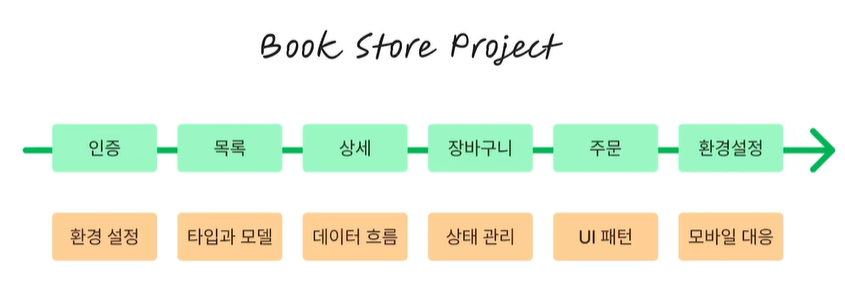
리액트 프로젝트 생성
CRA vs Vite
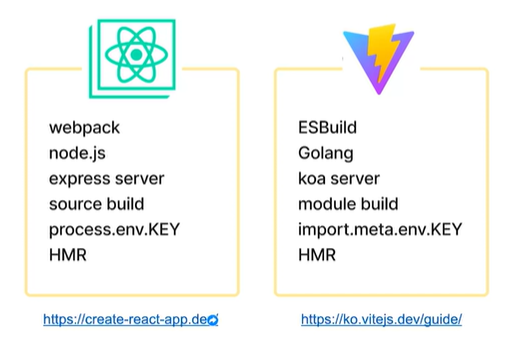
CRA 생성
- npx create-react-app [프로젝트명:book-store-c] --template typescript
- npm run : 쓸 수 있는 명령어 나옴
- npm run start : 서버 실행
Vite 생성
- npm create vite@latest book-store-v -- --template react-ts
- cd book-store-v
- npm i
- npm run
- npm run dev : 개발 서버 실행
CRA로 프로젝트 진행 - 폴더 구조
- App.test.tsx
- npm run test 하니 에러 남
- 화면 getByText를 book store로 고쳐줌
- render book store
- 패스됨 - 성공
프로젝트 폴더(디렉토리) 구조
- pages : 라우트 대응 페이지 컴포넌트(컨테이너)
- components : 공통 컴포넌트, 각 페이지에서 사용되는 컴포넌트
- utils : 유틸리티(함수)
- hooks : 리액트 훅
- model : 모델(타입), 데이터
- api : api 연동 위한 fetcher 등
CLI 명령어 살펴보기
package.json
"scripts": {
    "start": "react-scripts start",
    "build": "react-scripts build",
    "test": "react-scripts test",
    "eject": "react-scripts eject"
  },
npm run build
- 컴파일된 build 폴더 생성
- static 호스팅 하는 서버에 올리면 spa 앱 바로 실행 가능
npm run test
- test 파일 구동시켜줌
npm run eject
- webpack이 만들어놓은 설정 탈출할 때 사용
typecheck 추가하기
"typecheck": "tsc --noEmit --skipLibCheck"tsc 통해 타입체크 가능
- tsc : 타입스크립트 컴파일 명령어
- noEmit : 자바스크립트로 컴파일해서 출력하는 기능 비활성화
- skipLibCheck : 외부 라이브러리 타입체크 안하겠다.
tsconfig.json
컴파일옵션
- 타입스크립트를 자바스크립트로 컴파일할 때 필요한 라이브러리들
'프로젝트 > BookStore 사이트' 카테고리의 다른 글
| 1128 도서 상세 페이지 구현 (0) | 2025.11.28 |
|---|---|
| 1127 비밀번호 초기화, 도서 목록 페이지 구현 (0) | 2025.11.27 |
| 1126 라우트, 회원가입 (0) | 2025.11.26 |
| 1125 기본 컴포넌트 작성 및 테스트 - Title, Button, InputText, 헤더 푸터 (0) | 2025.11.25 |
| 1124 레이아웃 구성 및 테마 적용 - 전역 스타일 생성, 로컬스토리지 저장 (0) | 2025.11.24 |