웹 파이프라인/Jenkins
[트러블슈팅]Jenkins + Kubernetes Agent Pending / Docker Build 실패
thinktank911
2025. 12. 16. 14:17
1> 문제 발생 (Symptoms)
현상 1 — Jenkins 빌드가 계속 Pending
- Freestyle Project 실행 시
Waiting for next available executor
- Jenkins UI에서 에이전트가 잡히지 않음
- kubectl get pod -n jenkins 시 에이전트 Pod 생성되지 않거나 즉시 종료
현상 2 — docker 명령 실행 실패
/tmp/jenkinsxxxx.sh: docker: not found
현상 3 — Docker build 중 API 버전 에러
Error response from daemon: client version 1.43 is too old. Minimum supported API version is 1.44
2> 원인 파악 (Root Causes)
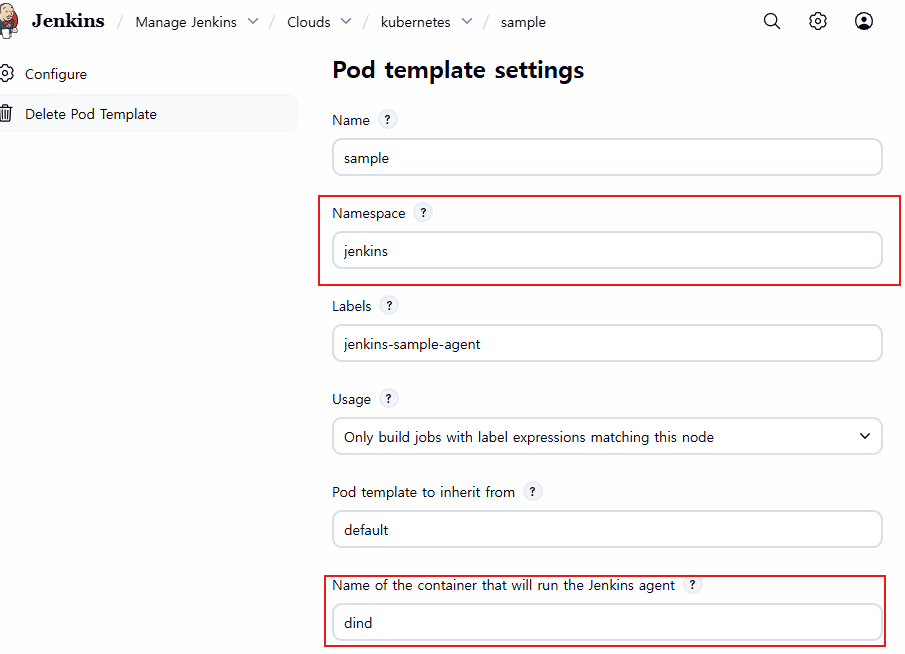
원인 1 — Pod Template Namespace 불일치
- Jenkins Controller는 jenkins 네임스페이스에서 실행 중
- Pod Template Namespace는 default 로 설정됨
👉 Jenkins가 다른 네임스페이스에 에이전트를 생성하려다 실패
Label matches no nodes
원인 2 — Jenkins Agent 컨테이너 지정 누락
- Pod Template 설정 중
Name of the container that will run the Jenkins agent 값이 비어 있음
👉 Jenkins가 어느 컨테이너에서 빌드를 실행해야 하는지 인식 못함
👉 executor 할당 실패 → Pending 상태
원인 3 — Docker Client / Daemon 버전 불일치
구성요소이미지
| Docker Daemon (dind) | docker:latest |
| Docker CLI (jnlp) | 구버전 포함 이미지 |
- docker:latest → 최신 daemon
- jnlp 컨테이너 → 오래된 docker client
👉 Docker API 버전 호환성 깨짐
client version is too old
3> 해결 방안 (Solutions)
해결 1 — Pod Template Namespace 통일
변경 전
Namespace: default
변경 후
Namespace: jenkins
📌 Jenkins Controller와 Agent Pod를 동일 네임스페이스로 통일
해결 2 — Jenkins Agent 실행 컨테이너 명시
Pod Template 설정: Name of the container that will run the Jenkins agent: dind
👉 Jenkins executor가 dind 컨테이너에서 정상 실행됨
👉 Pending 상태 해소
해결 3 — Docker Daemon 이미지 버전 고정
변경 전
docker:latest
변경 후
docker:24-dind
- Docker daemon & client API 버전 호환 확보
- docker build 정상 동작
4> 정리 (한 줄 요약)
Jenkins Kubernetes Agent 구성 시
Namespace 일치 + Agent 컨테이너 명시 + Docker 버전 고정은 필수 설정이다.