프로젝트/BookStore 사이트
1202 React-Query 사용, 리팩토링
thinktank911
2025. 12. 2. 13:16
중간회고
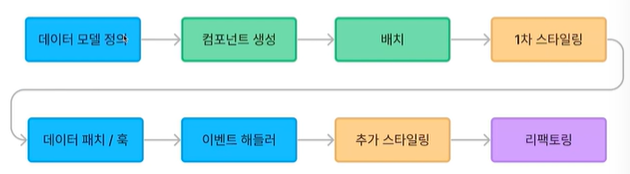
주요 학습 주제
- 타입과 모델
- 데이터 흐름
- 컴포넌트 작성
- css 스타일링
- 커스텀훅
1. 타입과 모델
- Record<ColorKey, string>
- key in HeadingSize
- 제너릭타입 Pick, Omit
2. 데이터 흐름
Books
BooksList > Books > useBooks > books.api.ts > http.ts
- 낙관적 업데이트
3. 컴포넌트 작성
- 조건부 렌더링 : isEmpty && (컴포넌트) / {isChecked ? <컴포넌트1>:<컴포넌트2>}
- map 루프
4. css 스타일링
display:flex
flex-direction : row(기본), column
align-items: 상하 정렬

display:grid - 바둑판
grid-template-column: repeat(몇개, 간격)
5. 커스텀 훅
생산성
1. 스니펫 사용
2. 기능 단위 작업 흐름 파악
KPT 회고

import alias
- 상대경로 ➡️ 절대경로 변경
CRACO 이용
- 참고링크 : https://craco.js.org/
- 설치 : npm i -D @craco/craco
- craco-alias 설치 : npm i -D craco-alias ➡️ 사라짐
➡️ react-app-alias 대체 : npm install --save-dev react-app-alias - tsconfig.paths.json 생성
- tsconfig.json과 같은 경로
{
"compilerOptions": {
  "baseUrl": ".",
  "paths": {
      "@/*": ["src/*"]
  }
}
}
- craco.config.js 생성
const cracoAlias = require("craco-alias");

module.exports = {
  plugins: [
        {
            plugin: cracoAlias,
            options: {
                source: "tsconfig",
                baseUrl: ".",
                tsConfigPath: "tsconfig.paths.json",
                debug: false
            }
        }
    ],
};
- tsconfig.json에 파일 확장 및 포함
"extends": "./tsconfig.paths.json",
  "include": [
    "src",
    "craco.config.js"
  ]
- package.json 변경
// 변경 후
"scripts": {
"start": "react-scripts start",
"build": "react-scripts build",
"test": "react-scripts test",

// 변경 후
"scripts": {
"start": "craco start",
"build": "craco build",
"test": "craco test",
중복 코드 제거
App.tsx 라우트 layout 중복 제거
api.ts 요청핸들러 메소드화
스니펫 만들기
스니펫 확장 도구
- Snippet Generator(fiore)
useAuth 훅 만들기
import { login, resetPassword, resetRequest, signup } from "@/api/auth.api";
import { SignupProps } from "@/pages/Signup";
import { useAuthStore } from "@/store/authStore"
import { useAlert } from "./useAlert";
import { data, useNavigate } from "react-router-dom";
import { LoginProps } from "@/pages/Login";
import { useState } from "react";

export const useAuth = () => {
    const { showAlert } = useAlert();
    const navigate = useNavigate();

    // 상태
    const { storeLogin, storeLogout, isloggedIn } = useAuthStore();

    // 메소드
    // 로그인
    const userLogin = (data: LoginProps) => {
        login(data).then((res) => {
            // 상태 변화
            storeLogin(res.token);

            // 성공
            showAlert('로그인이 완료되었습니다.');
            navigate('/');
        }).catch((err) => {
            // 실패
            showAlert('로그인에 실패했습니다.');
        });
    }

    // 회원가입
    const userSignup = (data: SignupProps) => {
        signup(data).then((res) => {
            // 성공
            // window.alert('회원가입이 완료되었습니다.');
            showAlert('회원가입이 완료되었습니다.');
            navigate('/login');
        }).catch((err) => {
            // 실패
            showAlert('회원가입에 실패했습니다.');
        });
    }

    // 비밀번호 초기화
    const userResetPassword = (data: SignupProps) => {
        resetPassword(data).then(() => {
            // 성공
            showAlert('비밀번호 초기화되었습니다.');
            navigate('/login');
        }).catch((err) => {
            // 실패
            showAlert('비밀번호 초기화에 실패했습니다.');
        });
    }

    // 리셋 요청 여부
    const [resetRequested, setResetRequested] = useState(false);

    // 비밀번호 초기화 요청
    const userResetRequest = (data: SignupProps) => {
        resetRequest(data).then(() => {
            // 성공
            setResetRequested(true);
        }).catch((err) => {
            // 실패
            showAlert('비밀번호 초기화 요청에 실패했습니다.');
        })
    }

    // 리턴
    return { userLogin,
            userSignup,
            userResetPassword,
            userResetRequest,
            resetRequested
        };
}
React-Query 사용
서버 스테이트 라이브러리
- 참고링크 : https://tanstack.com/query/latest
- 설치 : npm install @tanstack/react-query
- 장점 : 자동으로 데이터 동기화, 생산성 증가
쿼리 클라이언트 작성
queryClient.ts
import { QueryClient } from "@tanstack/react-query";

export const queryClient = new QueryClient();
App.tsx
import { QueryClientProvider } from '@tanstack/react-query';
import { queryClient } from './api/queryClient';

return (
    <QueryClientProvider client={queryClient}>
      <BookStoreThemeProvider>
        {/* <ThemeSwitcher /> */}
          <RouterProvider router={router} />
      </BookStoreThemeProvider>
    </QueryClientProvider>
  )
useBooks.ts
const { data: booksData, isLoading: isBooksLoading } = useQuery({
        queryKey: ["books", location.search],
        queryFn: () =>
            fetchBooks({
            category_id: category_id ? Number(category_id) : undefined,
            news: news ? true : undefined,
            currentPage: page ? Number(page) : 1,
            limit: LIMIT,
            }),
    });


  return {
        books: booksData?.books,
        pagination: booksData?.pagination,
        isEmpty: booksData?.books.length === 0,
        isBooksLoading
     }
로딩 인디케이터
- 확인법
➡️ 네트워크 : no throttling => slow 4G